
All courses / Editing in Premiere
Edit video with a word processor
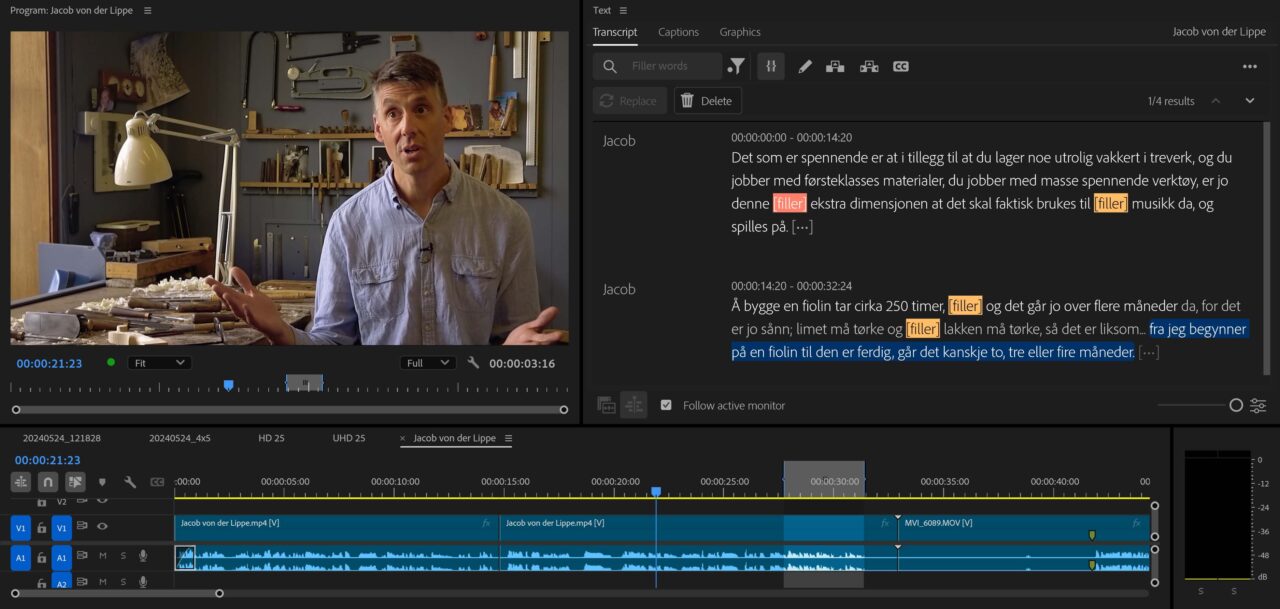
Premiere turns speech into text, and you edit the text. Copy, paste, cut, delete, move a paragraph — and the video follows. For anyone who cuts interviews, podcasts, meetings or voice-over, this is the largest single change to the job in twenty years.
One day on everything Premiere can now do for you, so you get to the finish line faster: the rough cut, the audio mix, the speech cleanup, the captions, the color pass, the vertical version, organizing the project, and finding the clip you know exists somewhere.
- Length1 day
- FormatOn site or online
- LanguageNorwegian or English
- CategoryEditing in Premiere
After the course you can
Editing faster with AI in Adobe Premiere
- Cut an interview by editing its transcript
- Remove hesitation, filler and pauses without touching the timeline
- Get a usable audio mix in minutes rather than an hour
- Find anything in a day of rushes by describing it in plain language
- Produce captions and a vertical version as a routine step, not a project
What we cover
The program
Text-based editing
- Speech to text, and how good it actually is
- Cutting interviews and voice-over as if it were a text document
- Removing everything one person says — every question in an interview, for instance
- Automatic handling of pauses, filler words and hesitation
- Keyword search in the transcript to find the themes fast
- Practical tricks that measurably improve transcription quality
- Hiding the joins with Morph Cut
Finding things
- Tell the AI Assistnat to organize your messy project
- Media Intelligence: plain-language search across everything you shot
- Automatic transcription of selected clips or all of them
- Recognizing several different voices in the same recording
- Stringouts for a fast overview of the rushes
Sound
- One-click speech repair
- Automatic mixing of speech, music and ambience with Auto Ducking
- Remixing music to the exact length you need
- Mix individual voice levels when people talk over each other
- Automatic syncing of separately recorded audio
- Generating ambience and effects where the location gave you none
Picture
- Automatic color correction and shot matching
- Extending a shot that is two seconds short with Generative Extend
- Splitting and re-editing a finished film with Scene Edit Detection
- Automatic reframing to vertical and square
Publishing
- Automatic subtitles, and a caption template you save once
- Podcast transcripts as a by-product
- Useful plugins worth knowing about
The honest bit
None of this makes the editorial decisions, and the day is careful about that line. The transcript will confidently mishear a name, the automatic color pass will be wrong on the shot that matters most, and the tool that removes hesitation will occasionally remove the pause that carried the meaning. You leave knowing where to look.
Who it is for
Anyone who cuts video or podcasts, and is short of time. Content producers, editors, journalists, communication staff and podcast producers.
Prerequisites
You should be able to edit in Premiere. This is not a substitute for a full beginner's course. Current version installed, one machine per participant.
Bring
Bring an interview you have not cut yet — or one you've already cut. Watching a real one collapse from forty minutes to four in front of the group is the whole argument.
Open courses
Prefer a fixed date for one person?
Also runs as an open course at Qross Kurssenter — classroom in Oslo and live online on the same dates.
Also runs as an open course at Institutt for Journalistikk, at Pressens hus in Oslo, with member pricing for the press organizations.
Questions
About this course
How well does the speech-to-text work?
Well enough to cut from, and not well enough to publish without reading it. Dialect, names and technical terms are where it slips. We spend real time on the tricks that raise the hit rate, because that is what decides whether the whole workflow is worth it.
Is our footage uploaded anywhere?
Some of these features run locally and some run in Adobe's cloud, and the distinction matters if you handle sensitive material. We go through which is which, and how to work with the cloud features switched off if your organization requires it.
Is this the same as the advanced Premiere course?
No, and they complement each other. The advanced course is about your habits and your setup. This one is about a specific set of features that has arrived in the last few releases, and most teams have adopted almost none of it.
Related courses
Related courses
2 daysAdobe Premiere — beginners
Most people who edit in Premiere taught themselves, which means each of them invented a way of working that nobody else understands.
2 daysAdobe Premiere — advanced
After a while everyone settles into habits.
2 daysColor correction and grading for video
Grading gets treated as the thing you do at the end if there is time.
Want this for your team?
Tell me what goes wrong today and you get a written plan and a price back. Two sentences is enough.